Written By: Sergey Georgiev
A small number of AirHub customers have reported reduced livestream quality, and in our own testing we have seen this on controllers running certain versions of DJI Pilot 2. We have not established where the cause lies. We are in active contact with DJI to look into it together, and we will update this article as soon as we know more.
In the meantime there is a workaround. For the customers we have worked with, removing the latest DJI Pilot 2 app update has restored stream quality. You can do it yourself on the controller in a few minutes, and this article shows you how. Everything happens on the controller itself, so you need no cable, no computer and no aircraft.
Before you begin
Removing the update removes all DJI Pilot 2 app data. That includes:
your DJI account login
cached maps
saved flight routes
the saved streaming and Cloud API link to the AirHub platform
The AirHub connection does not survive this and has to be set up again afterwards. That is a separate documented procedure, so please do not start this in the field. Contact csm@airhub.nl first, so we can plan the reconnection with you.
While we are still looking into this, we would also suggest holding off on further Pilot 2 updates on the controllers you use for streaming.
Is your controller affected?
Controller | App version | What AirHub has observed |
|---|---|---|
DJI RC Plus 2 | 17.3.0.24 | Reduced livestream quality seen |
DJI RC Plus | under review | Currently being investigated, we do not yet have a conclusion |
DJI RC Pro | 17.3.0.21 | No difference seen |
These are early observations from a limited number of controllers. We cannot call it a confirmed pattern yet. If your stream quality has dropped and your setup is not listed here, please tell us. Every data point helps us and DJI narrow it down.
Part 1: check your app version
1. Open DJI Pilot 2 on the controller
Start from the DJI Pilot 2 home screen you normally see when you power the controller on. You do not need to connect the aircraft, and you do not need to close the app. The version number is inside it.
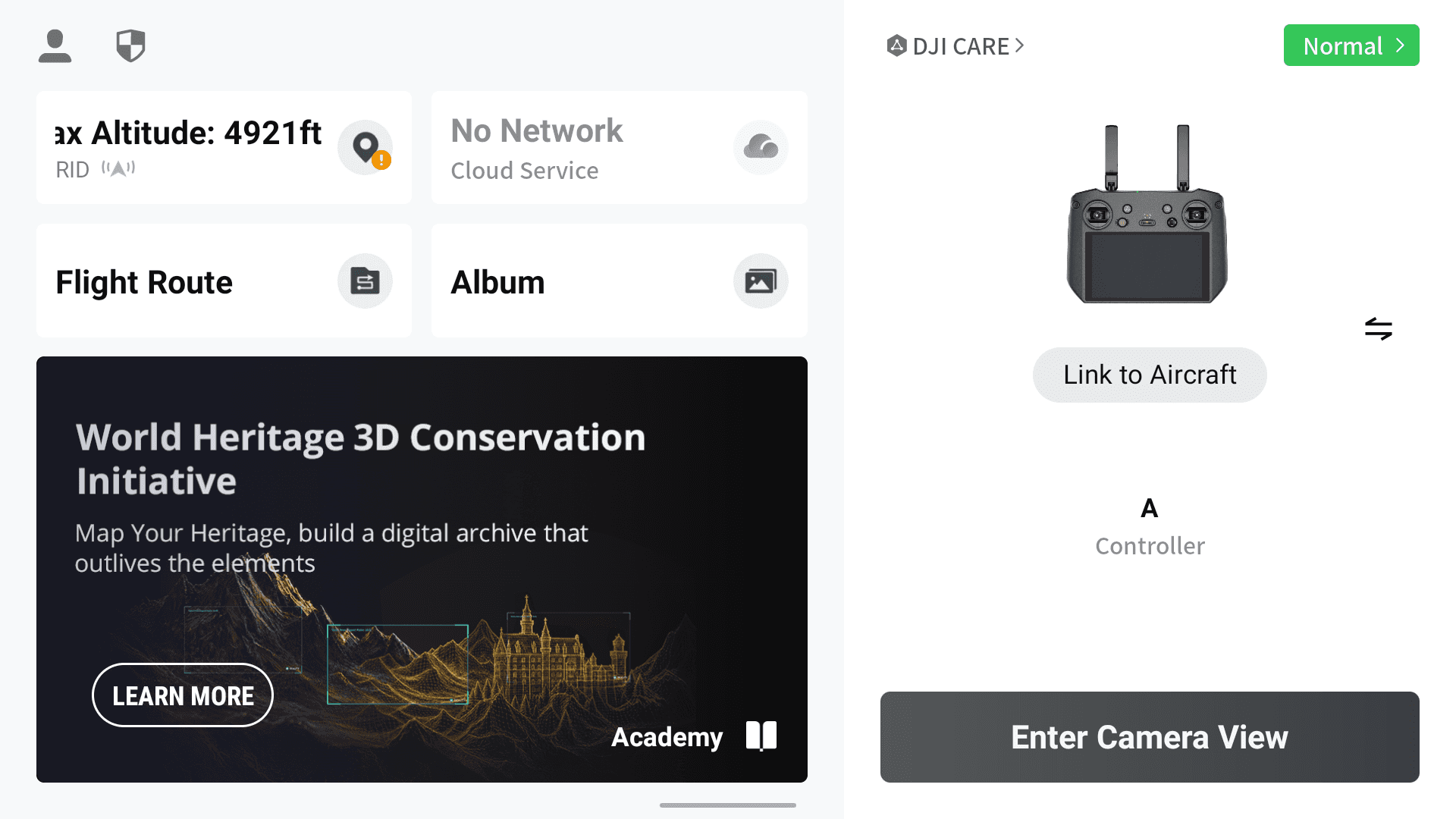
DJI Pilot 2 home screen. Your starting point.
2. Open Common Settings
Tap Enter Camera View. Then tap the ••• button in the top right corner, which opens the toolbar along the right edge of the screen. Now tap the ••• button at the bottom of that toolbar. The Common Settings panel slides in. Scroll to the bottom of it and tap About.
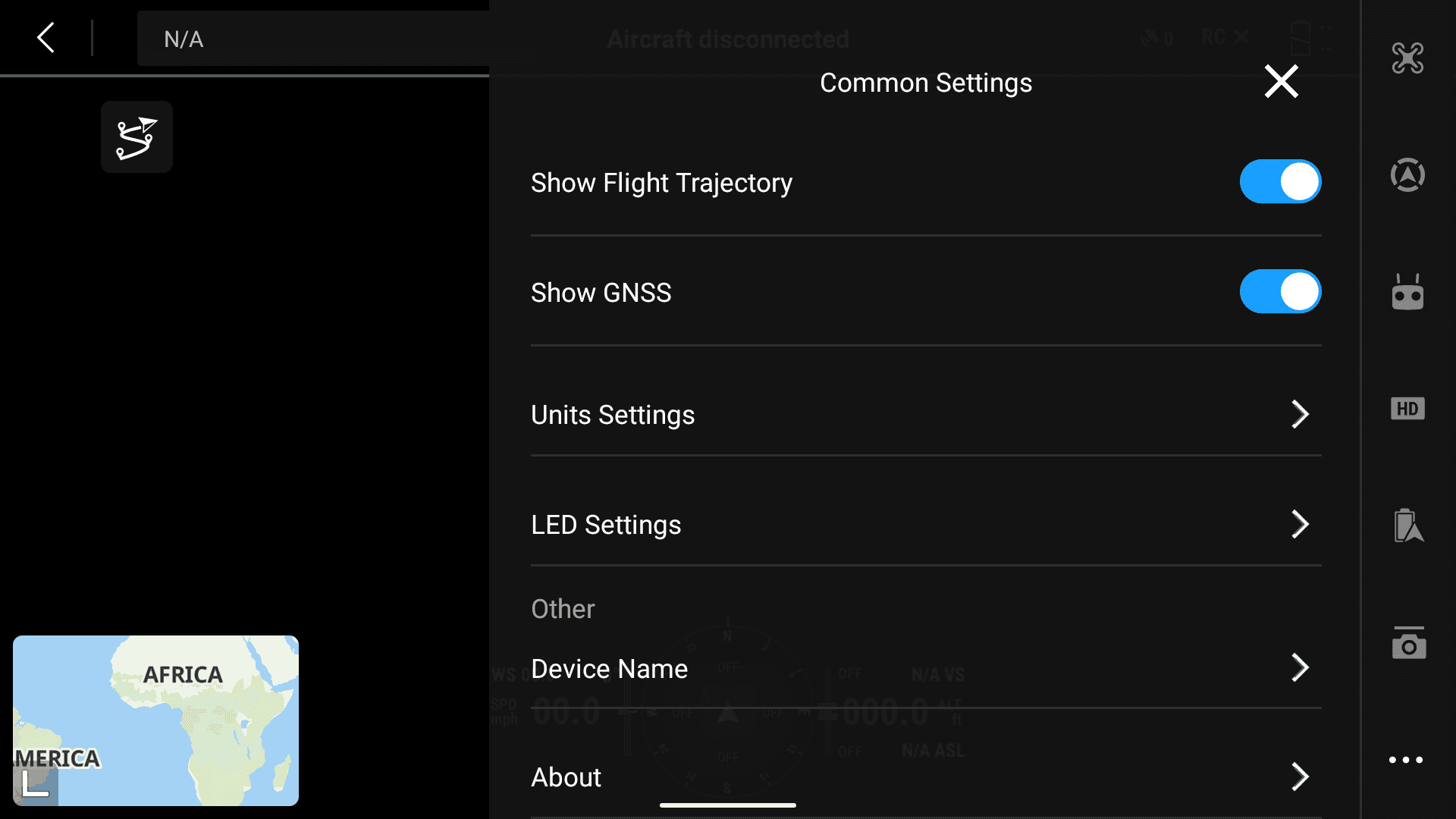
Common Settings, then About. Scroll to the bottom of the panel, under Other. The toolbar holding the second ••• button runs down the right edge.
3. Read the App version
The first row, App, is your DJI Pilot 2 version. Note it down exactly as the screen shows it, for example 17.3.0.24, and compare it with the table above.
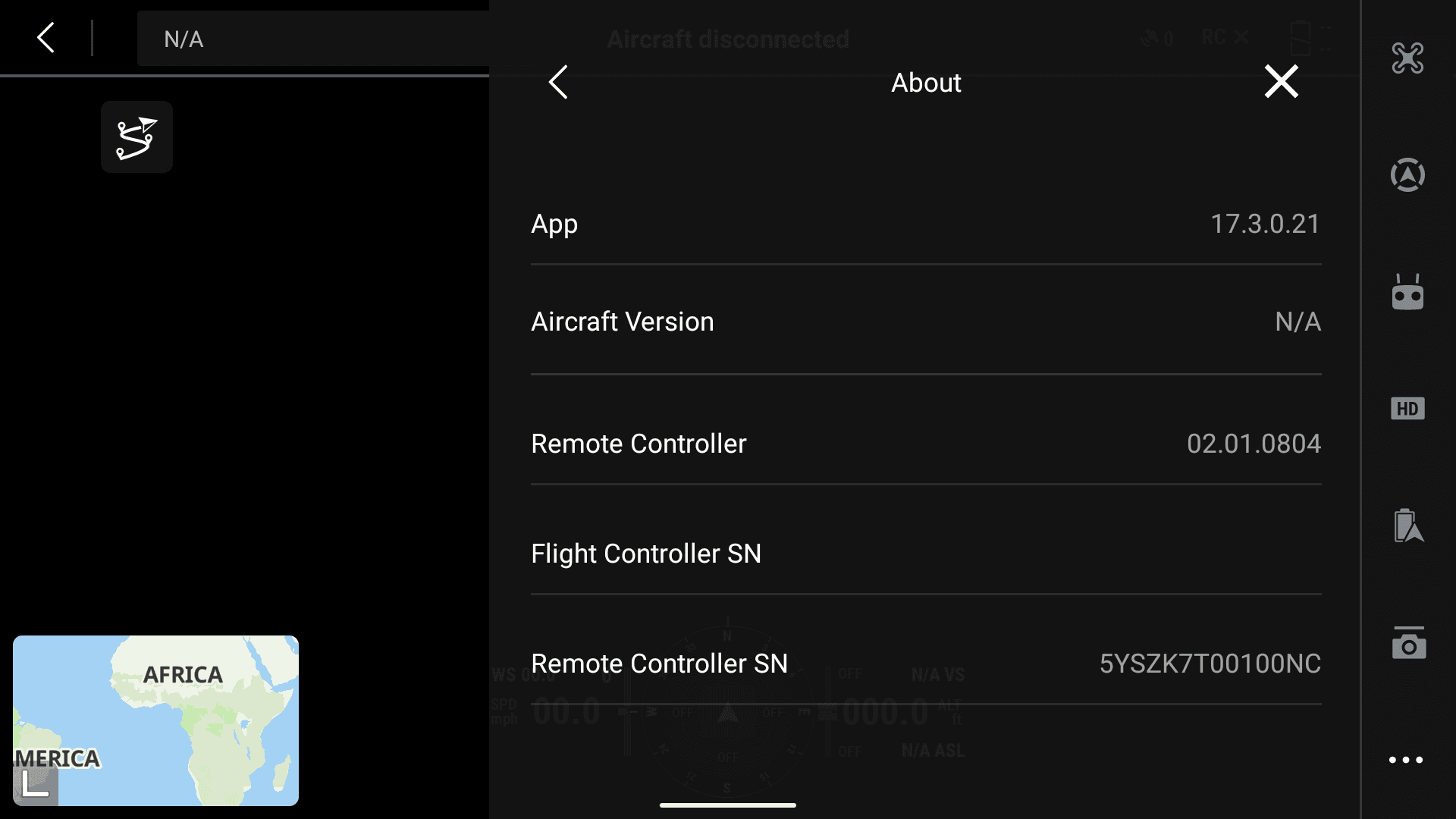
The App row at the top of About. The version shown here is only an example, not the version to look for. The controller serial number has been blurred.
If your version is not affected
Stop here. There is no reason to remove the update, and doing so will cost you your app data for no benefit. If your stream quality is still poor, contact csm@airhub.nl with your controller model and app version.
Part 2: remove the app update
Last check before you continue
From this point on, your DJI account login, cached maps, saved flight routes and the saved AirHub streaming connection will be removed. Only continue when you are not about to fly, and when AirHub support can help you reconnect afterwards.
What "factory version" means here. Android calls this Uninstall updates, and the confirmation dialog mentions a "factory version". This does not take you back to the app your controller had when it was new. It removes the latest DJI Pilot 2 app update and leaves you on the Pilot 2 version that came with the RC firmware currently installed on your controller. Your controller firmware is not touched.
4. Open the controller's settings
Swipe down from the top of the screen to open the control centre, then tap the gear icon in the top right corner. This leaves DJI Pilot 2 and opens the controller's Android settings.
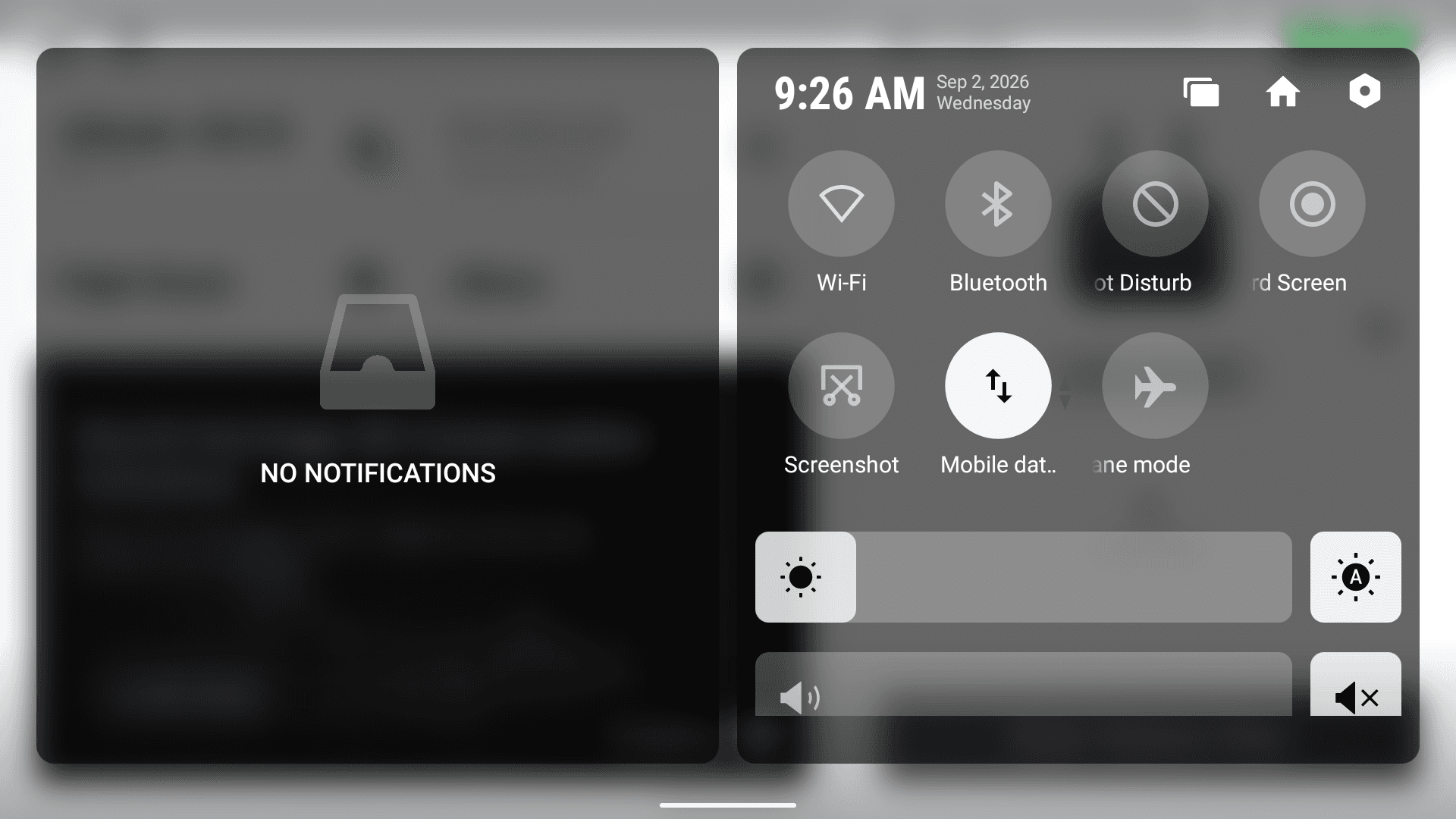
The gear icon, top right of the control centre.
5. Open Apps & notifications
In the settings list, tap Apps & notifications.
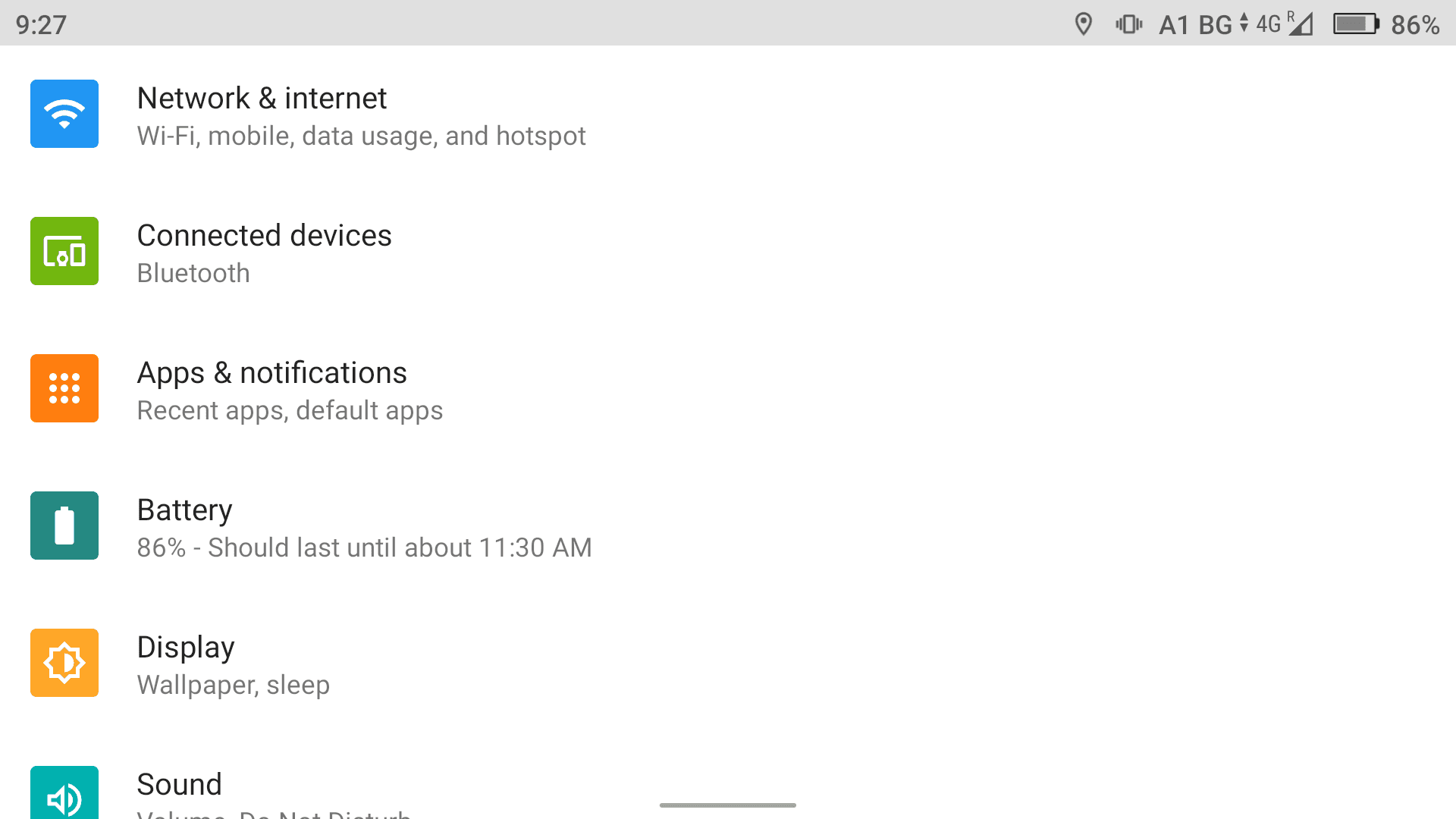
Apps & notifications, third item in the settings list.
6. Select DJI Pilot 2
Because you have just been using it, DJI Pilot 2 appears under Recently opened apps. Tap it there. If it is not listed, tap SEE ALL 12 APPS and find it in the full list.

DJI Pilot 2 under Recently opened apps, or via SEE ALL 12 APPS.
7. Check you are on the right screen
You should now see the App info screen for DJI Pilot 2, with OPEN, DISABLE and FORCE STOP across the top. Confirm the app name reads DJI Pilot 2 before you go on. Please leave DISABLE and FORCE STOP alone, because neither one removes the update.
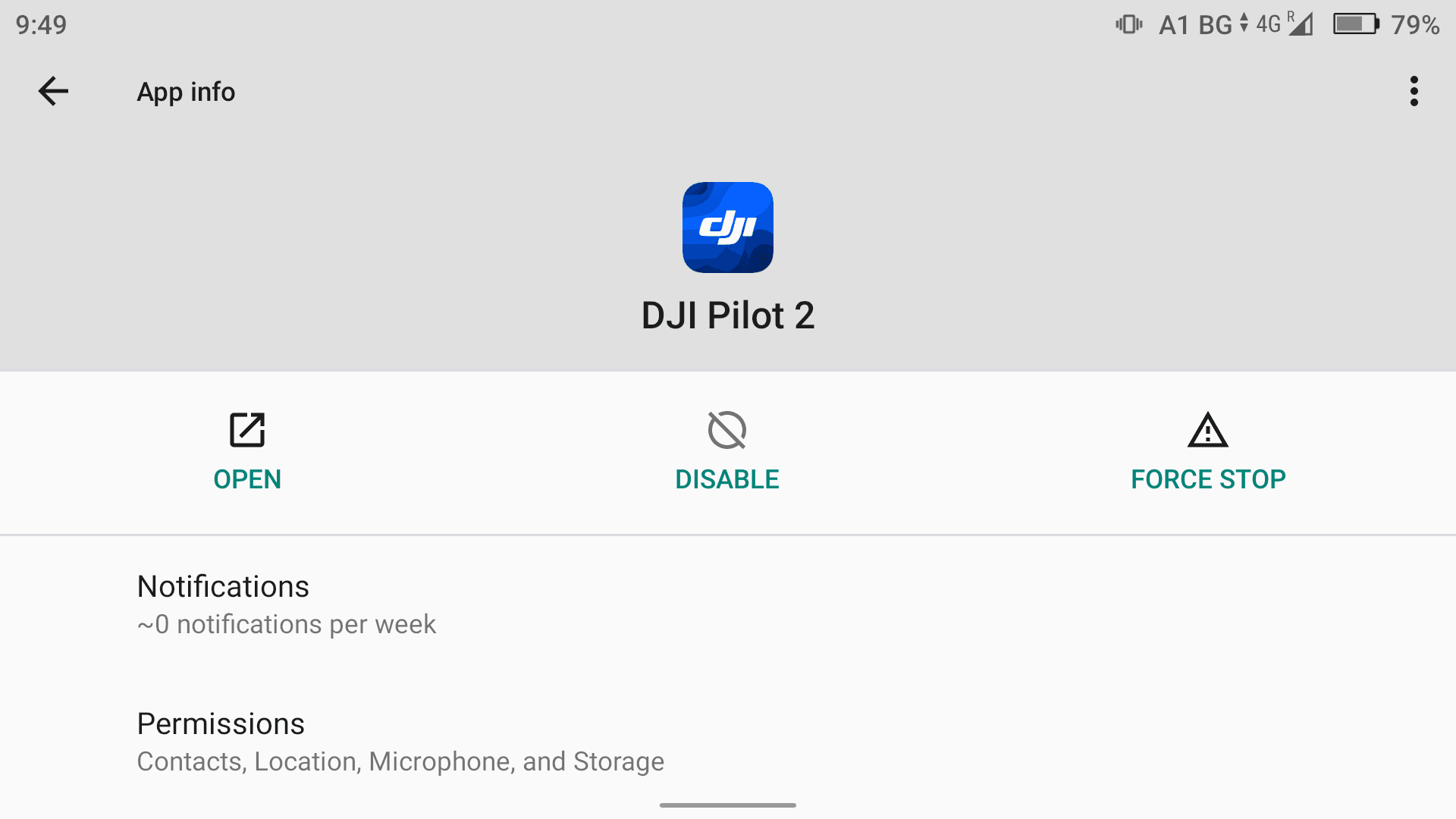
App info for DJI Pilot 2. Do not tap DISABLE or FORCE STOP.
8. Tap Uninstall updates
Tap the ⋮ menu button in the top right corner of the App info screen, then tap Uninstall updates.
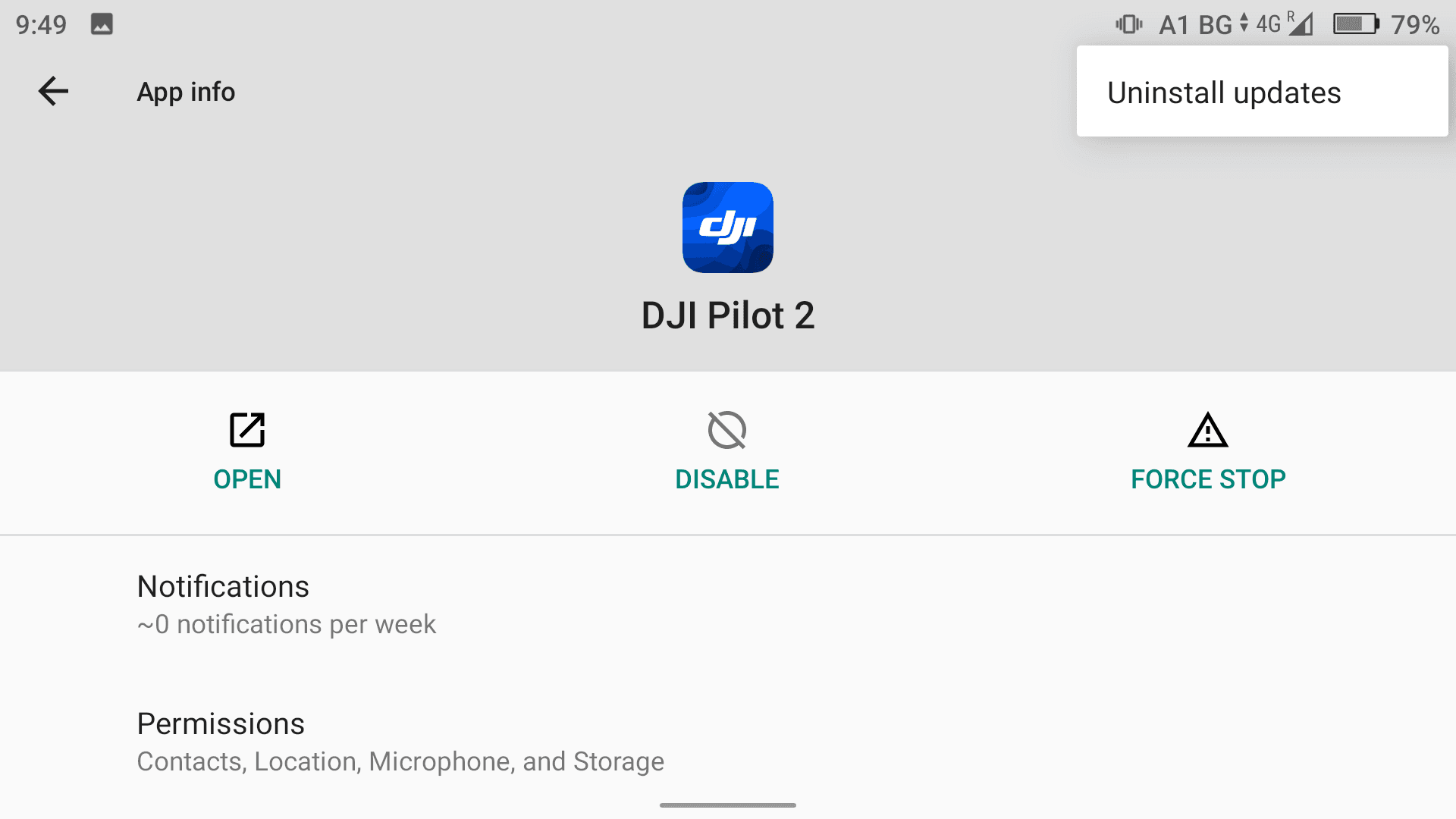
Uninstall updates, the only item in the menu.
No Uninstall updates option?
Then no app update is installed. You are already on the Pilot 2 version that came with your controller firmware, and there is nothing to remove. Close the settings and contact csm@airhub.nl if your stream quality is still poor.
9. Confirm with OK
A dialog asks Replace this app with the factory version? All data will be removed. Tap OK. The controller removes the app update and puts you back on the Pilot 2 version that came with your installed RC firmware. It takes a few moments and there is no completion message. The dialog simply closes and you are back on the App info screen.
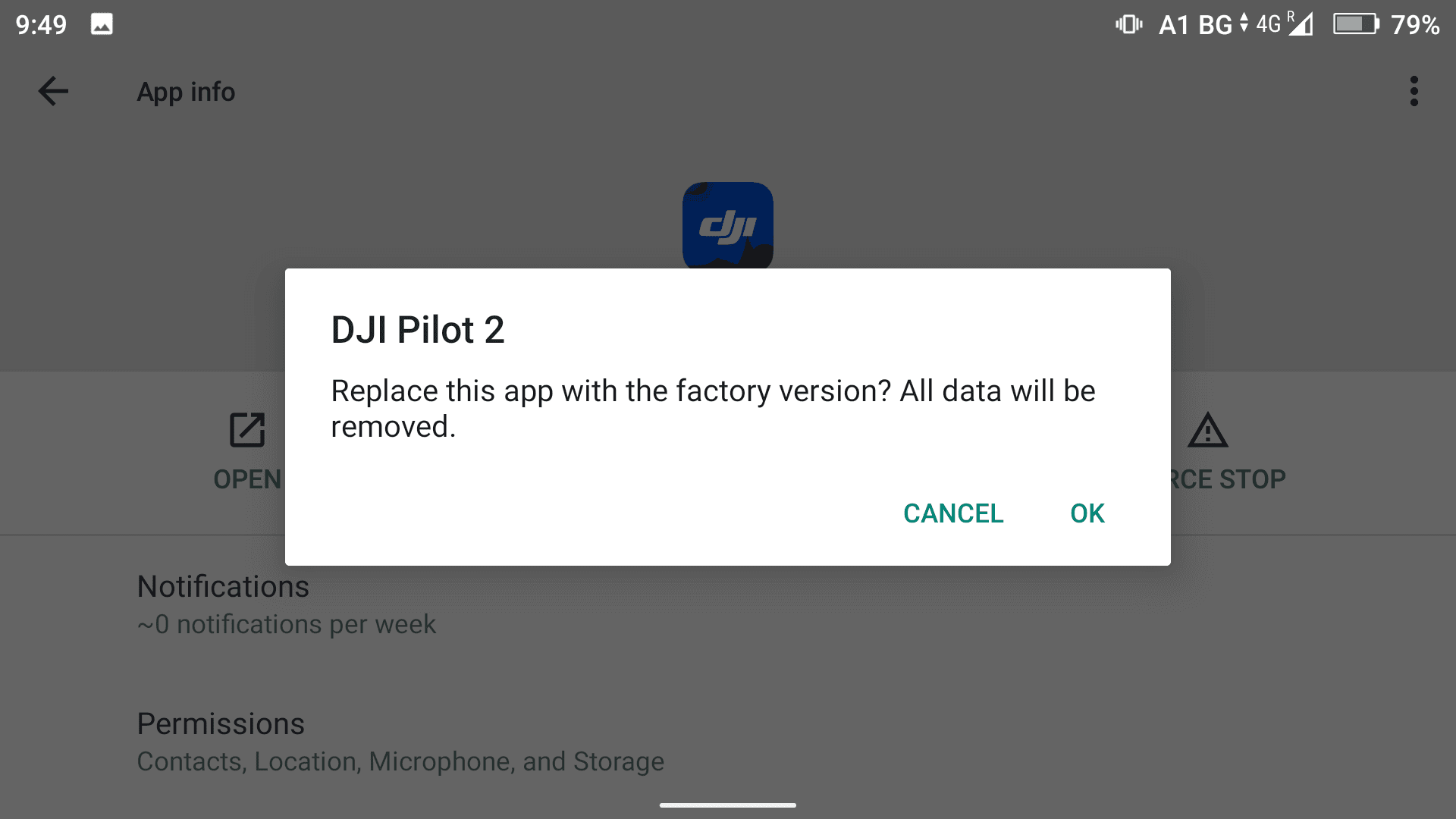
Tap OK to remove the update. Despite the wording, your controller firmware is not affected. CANCEL leaves the app untouched.
After removing the update
DJI Pilot 2 is now back on the version that came with your installed RC firmware. The controller does not need to be restarted, so you can open the app straight away. To confirm it worked, follow Part 1 again and check that the App version has changed.
The app will not update itself again. Nothing further is needed to keep it on this version, and no automatic update will undo your work.
Your AirHub connection needs to be restored. DJI Pilot 2 opens as if it were new: no DJI account, no cached maps, no saved flight routes, and no streaming connection to the AirHub platform. You will not be able to stream until the connection is set up again. Contact csm@airhub.nl and our team will walk you through it.
Troubleshooting
What you see | What it means |
|---|---|
No Uninstall updates in the menu | No app update is installed. You are already on the version that came with your controller firmware. |
Stream will not start afterwards | Expected. The Cloud API link to AirHub was removed with the app data. Contact csm@airhub.nl. |
Not sure which version you are on | In camera view, tap ••• top right, then ••• at the bottom of the toolbar, then Common Settings, then About, and read the App row. |
Quality still poor afterwards | Contact csm@airhub.nl with your controller model and app version, so we can add it to our investigation. |
Quick reference
Step | Where |
|---|---|
1 to 3 | DJI Pilot 2 → camera view → ••• top right → ••• bottom of toolbar → Common Settings → About → read App |
4 to 5 | Swipe down → gear → Apps & notifications |
6 to 7 | DJI Pilot 2 → App info |
8 to 9 | ⋮ → Uninstall updates → OK |
After | Contact csm@airhub.nl to restore your AirHub connection |
Worth remembering
Check your version first, because not every controller is affected.
Removing the update wipes your DJI login, maps, flight routes and the AirHub streaming connection.
Do not do this in the field. Do it where AirHub support can help you reconnect.
Your controller firmware is not affected. Only the Pilot 2 app update is removed.
No controller restart is needed, and the app will not re-update itself.
Hold off on further Pilot 2 updates until we confirm the cause.
Still need help?
Email csm@airhub.nl with your controller model and DJI Pilot 2 app version, and tell us what you are seeing on the stream. That gives us what we need to help you and to add your setup to the investigation.
Related articles